A Appendix B
A.1 C Definitions for R Base Types
A fundamental understanding of R base types requires consideration of C API code that underlies R itself. The R base type framework is codified in a series of internal C header files (see Section 9.5.1.3), including Defn.h, Rinternals.h and R.h. The file Rinternals.h can be revealed in R using: path <- file.path(R.home("include"), "Rinternals.h"); file.show(path). Three important C entities are referred to or defined in Rinternals.h1: SEXP, SEXPTYPE, and SEXPREC (Fig A.1).
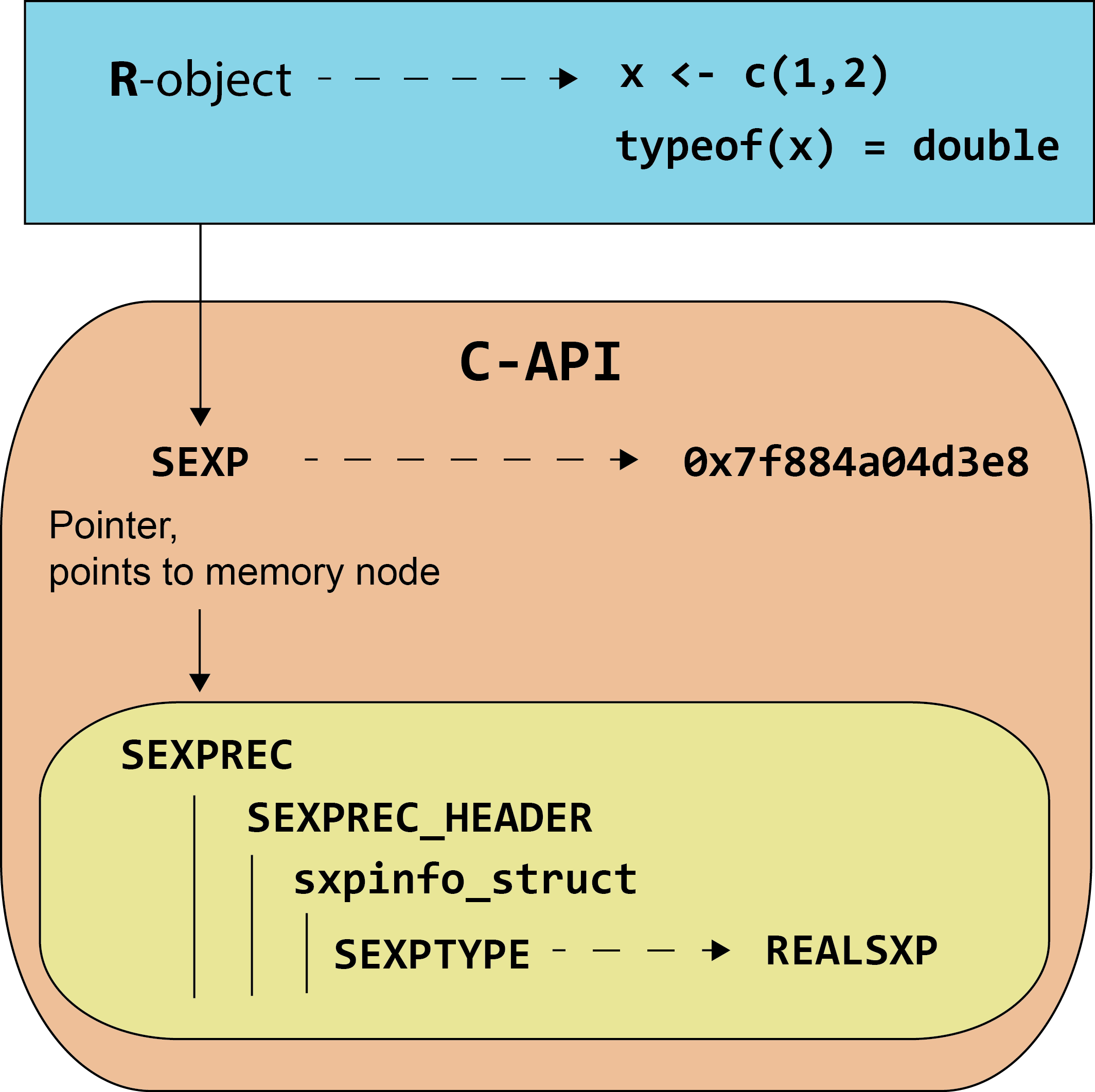
FIGURE A.1: Relationship between R object base types and C-API processes. The R object x of base type double is created. In the R C-API, x is allocated to an SEXP pointer with address 0x7f884a04d3e8. The SEXP points to an SEXPREC with the SEXPTYPE, REALSXP.
- An
SEXP(S-expression) serves as a pointer (a variable that stores the memory address of another variable) for anSEXPREC(Fig A.1). At a fundamental level, all R objects are managed usingSEXPC pointers. The relationship betweenSEXPandSEXPRECis codified on Line 186 inRinternals.hwhich reads:
-
In the code above,
typedef creates an C alias framework. Specifically, SEXP is defined to be an alias and a pointer (indicated with the * prefix) for SEXPREC, a C data structure (defined with struct) that groups entities.SEXPTYPEs (S-expression types) are C data type reference names that correspond to the 24 R base types (Section 2.4.8)2.SEXPTYPEs (e.g.,NILSXP,SYMSXP,REALSXP, etc.) are grouped and numbered in a typedef beginning on Line 109 inRinternals.h, with the codetypedef unsigned int SEXPTYPE;which allowsSEXPTYPEs to be identified using unsigned integers.SEXPRECs (S-expression records) codify the C data holding structures for all R objects. TheSEXPRECframework is comprised of several distinct components defined in the header fileDefn.h3. These components includesxpinfo_struct, a 64 bit (Section 12.4) metadata structure, defined on Lines 130-149:
struct sxpinfo_struct {
    SEXPTYPE type      :  TYPE_BITS;
    unsigned int scalar:  1;
    unsigned int obj   :  1;
    unsigned int alt   :  1;
    unsigned int gp    : 16;
    unsigned int mark  :  1;
    unsigned int debug :  1;
    unsigned int trace :  1;
    unsigned int spare :  1;
    unsigned int gcgen :  1;
    unsigned int gccls :  3;
    unsigned int named : NAMED_BITS;
    unsigned int extra : 32 - NAMED_BITS;
}; /*           Tot: 64 */
Components of sxpinfo_struct are discussed in (R Core Team (2024), Section 1.1.2). Of particular interest, the code SEXPTYPE type : TYPE_BITS; 1) identifies an object’s SEXPTYPE (given in type, which in turn is pulled from definitions in the SEXPTYPE typedef), and 2) the number of bits allocated to an object (given in TYPE_BITS).
SEXPRECs is a C preprocessor macro that incorporates sxpinfo_struct and other structures, and serves as a header for every SEXPREC:#define SEXPREC_HEADER \
struct sxpinfo_struct sxpinfo; \
struct SEXPREC *attrib; \
struct SEXPREC *gengc_next_node, *gengc_prev_node-
A union of this header and structures for several
SEXPTYPES defined on Lines 151-158 in Defn.h is codified as:typedef struct SEXPREC {
SEXPREC_HEADER;
union {
struct primsxp_struct primsxp;
struct symsxp_struct symsxp;
struct listsxp_struct listsxp;
struct envsxp_struct envsxp;
struct closxp_struct closxp;
struct promsxp_struct promsxp;
} u;
} SEXPREC;-
Notably, R vectors have their own
SEXPREC framework called a VECTOR_SEXPREC (see Lines 222-225 in Defn.h).References
In addition to codifying base types frameworks,
Rinternals.hcreates preprocessor macro aliases withRf_prefixes for many processes that underlie R (code currently starting on Line 840). For instance, on Line 913 in the currentRinternals.h, we have:#define eval Rf_eval. C source code for processes likeevalwill not be visible after R is compiled/built on your computer (unless you choose to build R from source), but can be viewed, within a large collection of files, at https://github.com/wch/r-source/tree/trunk/src/main. For example, in the fileeval.c, the specific code forevalcurrently starts withSEXP eval(SEXP e, SEXP rho)on Line 1082.↩︎There are currently three additional
SEXPTYPEs that do not have corresponding R base types. These are:NEWSXP, used temporarily during object generation,FREESXP, which tags a memory node that has been released by garbage collection, andFUNSXPwhich groups different types of R functions (see Section 8.1.1)↩︎Underlying C code for the file
Defn.hwill not be available after R is compiled/built.Defn.hsource code, however, can be viewed at https://github.com/wch/r-source/blob/trunk/src/include/Defn.h.↩︎